Versions and undo
Every change is saved as a version, so you can compare, go back and never lose work.
Every time the AI finishes a request, or you save an edit, Site Haus saves a version of the whole project. Nothing is overwritten, so you can always go back.
Open the version history#
Press the Version history (clock) button at the top right of the project. You see the list of versions with a short note about what changed in each.
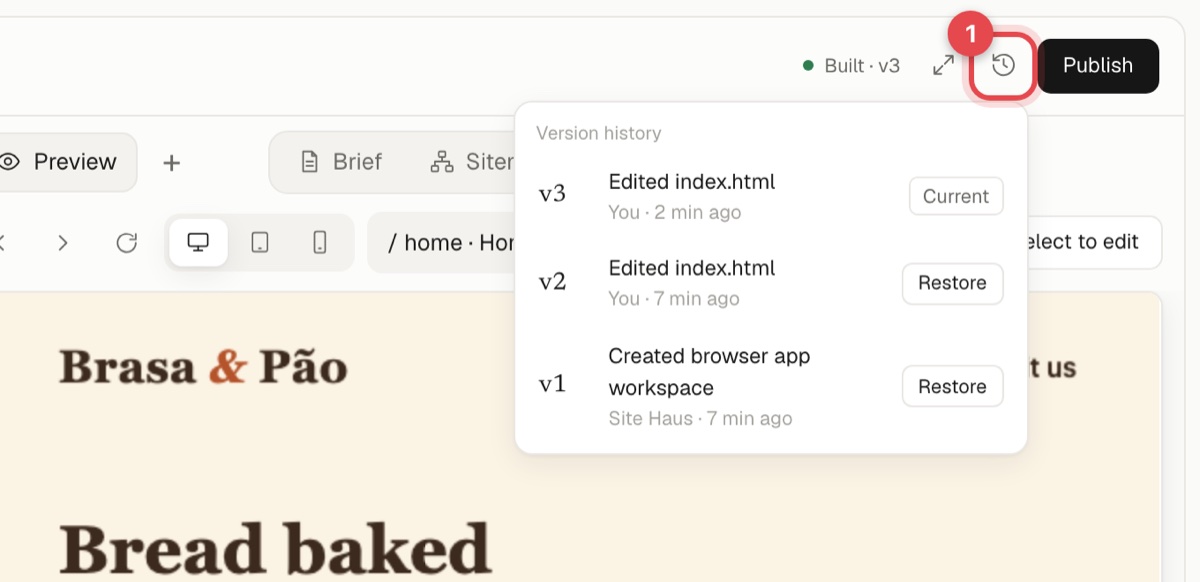
From there you can:
- Restore any version. The project goes back to exactly how it was. Restoring is itself saved as a new version, so you do not lose the later work either.
- Open a code diff to see which files and lines changed between versions.
Stop a run#
If the AI is working and you see it going the wrong way, press the stop button. Nothing from that run is saved, and you can reword your request and try again.
If the AI breaks something#
Restore the last version that worked, and describe the change again more carefully. Smaller, specific requests are less likely to go wrong than large ones.